
Claude Code
AnthropicSession, weekly and per-model limits.
session18% left
via claude code or claude.ai
Burnstate puts every AI coding limit in your menu bar and measures it against the clock. Know when to push, when to pace yourself, and exactly when you’d run dry, hours before it happens.
it’s live · open ember in the menu bar, try anything, answer claude code
Session, weekly and per-model limits.
via claude code or claude.ai
Session and weekly limits.
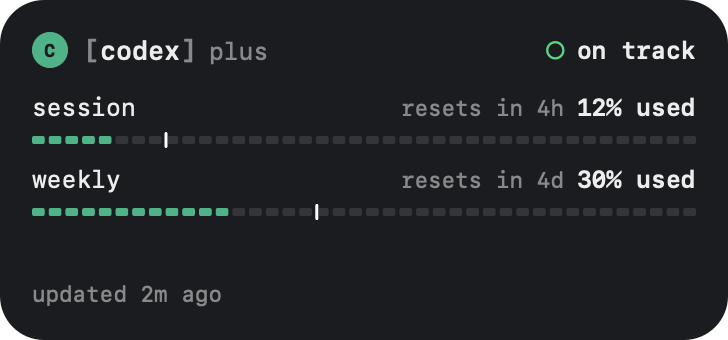
via codex cli or chatgpt sign-in
Included usage across the billing cycle.
via cursor app or browser sign-in
AI Gateway credits, as a balance.
via vercel cli or an api key
If a provider’s CLI or app is signed in on your Mac, Burnstate reads that login and never changes it. If not, you sign in from Burnstate, in your browser or with an API key. More providers are on the way.
A percentage tells you where you are. Burnstate tells you where you’re headed. Every meter carries a white tick for how much of the window has passed. Fill ahead of the tick means you’re burning faster than the clock, and Burnstate says so in plain words.
See the burn rate, not just the balance.
A forecast that only speaks up when you’d hit the wall before reset.
Ember starts sweating in the menu bar the moment anything burns hot.
Hours with agents blur together. Cooldown notices when you’ve been at the keyboard too long, reminds you about lunch and dinner, and tells you when to call it a day. Hand your idle agents a task before you step away, and Burnstate tells you what they did when you’re back.
Cooldown reads only how long your keyboard and mouse have been idle, never what you type. It runs on your Mac, it’s on from the start, and every time in it is yours to move.
Stop alt-tabbing to check on your agents. The moment a turn finishes, a session needs you, or a limit is about to run dry, a card floats in over whatever you’re doing. Over full-screen apps, on every Space, and it never steals focus.
Seven kinds, seven switches. Flip one here and the demo listens.
When Claude Code wants to run a command, edit a file or fetch a page, the question lands in a card, in plain words. Allow or deny right there. Your terminal still shows its own prompt, and whichever you answer first wins.
When Claude Code stops to ask which way to go, the choices land in a card. Each question is a step, each option a row with its reason. Pick, tick several or type your own, then submit, and Claude carries on with your answers.
See what’s working, what’s waiting on you and what just wrapped, across every terminal and editor. Open a session for its tokens, estimated cost, models and cache hits, then copy one line that resumes it in the right folder.
Today’s tokens, requests and estimated spend. Which models did the heavy lifting. A seven-day chart of your rhythm. All computed from logs already on your Mac.
Burnstate turns up to a year of Claude Code, Codex and Cursor history into one page: tokens, streaks, your peak day and the models you leaned on, plus the Setapp AI credits you spent. Share it as a link or an image. The numbers ride inside the link itself, so nothing is uploaded.
Native widgets in three sizes. Pin one provider or let it follow whichever is closest to running out. Overview stacks every provider, tightest first.



Burnstate spots new Claude Code and Codex releases and updates them the way you installed them: native, npm, bun, pnpm or Homebrew.
Ember dozes, works with your agents, hops when one needs you, sweats when a limit burns fast and burns out when one is spent. Show a provider’s percent beside it, or Ember alone.
Count down what you can still spend, or count up what you’ve spent.
Once the panel is open: ⌘1 and ⌘2 switch tabs, ⌘F searches, ⌘N adds a provider, ⌘, opens the settings window and Esc goes back.
Numbers freeze until you’re back.
SwiftUI through and through. Lives in the menu bar, never in your Dock.
Burnstate uses your own logins and asks each provider directly for your numbers. Tokens, costs and session history are computed from local logs. The direct edition checks its license key with burnstate.dev, and that’s all it ever sends us.
tokens, cost and sessions: computed from logs on this mac
Buy a license for the Macs you code on and keep it for good, or subscribe by the month or the year. Every update is included.
$24.99a year48% less than monthly
Claude Code, Codex, Cursor, Vercel and Setapp AI. Each one shows its own limits: sessions and weekly windows, billing cycles or credit balances. More providers are on the way.
Each provider connects its own way, and you choose which ones. If Claude Code, the Codex CLI, the Cursor app or the Vercel CLI is signed in on your Mac, Burnstate reads that login and never changes it, so it can’t sign you out. If not, you sign in to Codex or Cursor from Burnstate in your browser, or paste an AI Gateway API key for Vercel. Burnstate keeps that login or key in its own Keychain item. For Claude, the sign in button runs Claude Code’s own login. If Claude Code has no working login, Burnstate reads your limits from claude.ai with your session in the Claude app or your browser.
Only to the providers themselves. Burnstate asks each provider’s own API for your limits and computes tokens and cost from logs on your Mac. AI insights go to Setapp AI, and only when you ask for one. The direct edition also checks its license key with burnstate.dev, and sends nothing else. No account, no analytics.
Yes, with a burn report: up to a year of Claude Code, Codex and Cursor usage, plus the Setapp AI credits Burnstate has tracked, on one page, built on your Mac. Burnstate opens it as a burnstate.dev link with the numbers packed after the #. Browsers never send that part to a server, so sharing the link shares the report without uploading it. You can also copy it as an image.
Every limit runs on a window, like five hours or a week. The tick marks how much of that window has passed. If your usage is ahead of the tick, you’re burning faster than the clock, and Burnstate tells you when you’d run out at that pace.
Yes. On launch Burnstate adds a hook to ~/.claude/settings.json, with nothing to turn on. Adding it saves that file again with its keys sorted; your settings stay as they were. Each prompt shows up as a card with allow and deny. Your terminal still shows its own prompt, and whichever you answer first wins. If Burnstate isn’t running, Claude Code works exactly as before.
Yes. When Claude Code asks you to choose, through the same hook, the card walks through each question as a step. Pick an option, tick several, or type your own answer, then submit. The terminal still offers its own picker, and whichever you finish first wins. Questions have their own switch in settings if you’d rather answer in the terminal.
They float in the top-right corner, never take focus, pause while you hover and swipe away. Each of the seven kinds has its own switch, so you keep only the ones you want.
Yes, with Cooldown. It reminds you after 90 minutes at the keyboard without a pause, around lunch and dinner, when it’s time to wind down and when you planned to stop. A break counts only time away, so typing pauses its clock. Before you go, you can hand idle agents a task, and they keep working while you’re gone. The break locks the Mac until it ends, which you can turn off. When you’re back, a welcome back shows what each agent did and the cards that waited. Cooldown reads only how long your keyboard and mouse have been idle, never what you type. Every time is yours to change, or turn it off in settings.
It uses published per-token API prices, including cache reads and writes, applied to your local logs. Subscriptions aren’t billed per token, so think of it as what that work would cost at API rates. Cursor’s numbers come straight from Cursor.
Any Mac running macOS 15 Sequoia or later. Burnstate is a native SwiftUI app that lives in the menu bar. Insights from Apple Intelligence need macOS 26 Tahoe on an Apple silicon Mac.
The direct download is a one-time license with updates included, sized to the Macs you use: $49.99 for 1 Mac, $69.99 for 2 Macs, $89.99 for 3 Macs. The same license also comes as a subscription, from $3.99 a month or $24.99 a year. Creem sells it and emails the receipt and your key. Setapp gets you Burnstate plus 260+ other Mac apps for one membership, with its own 7-day trial. The Mac App Store edition, coming soon, is a one-time purchase. It runs in Apple’s sandbox, so it asks once to read your home folder, leaves updating your coding tools to you, and answers insights with Apple Intelligence on your Mac.
Put it in the menu bar, where you can see it coming.
53.9B tokens in the last year